FAQs
Using MoDraw on macOS
Using MoDraw on macOS is not officially supported. However, MoDraw can be run inside a virtual machine running Microsoft Windows on a iMac.
Please refers to softwares like Parallels Desktop or VirtualBox for further informations.
Using Opportunities in MoDraw
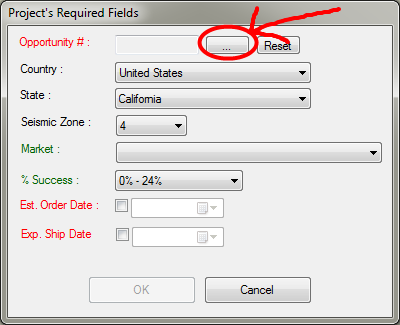
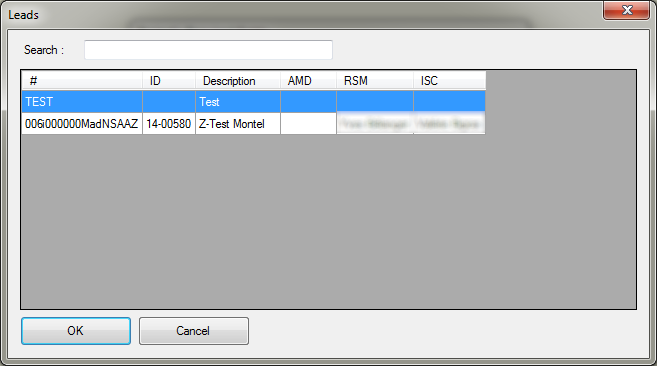
Now in MoDraw, the Opportunity field is required. You can choose from the list by clicking the ... button.
There is also a special Opportunity named CONSULTATION in case your MoDraw project is an old project you just want to consult.
MoDraw 3D Error
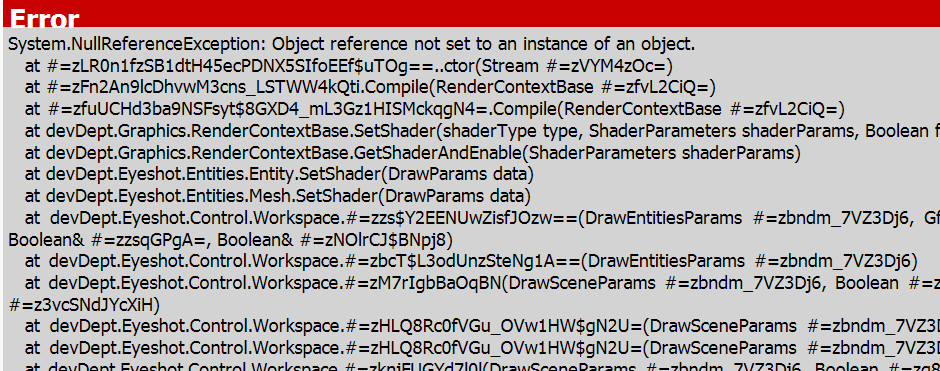
When there is an error in the 3D view of MoDraw (like the image above), it is usually a bug with the 3D graphic card driver. Here are the things that can help :
- Restart the computer (sometimes, it is sufficient)
- Update the 3D driver and restart Windows
- Open the 3D settings via menu Help / Setting 3D and try the options described below
If it doesn't solve the issue, please report again so we could investigate further.
3D Settings
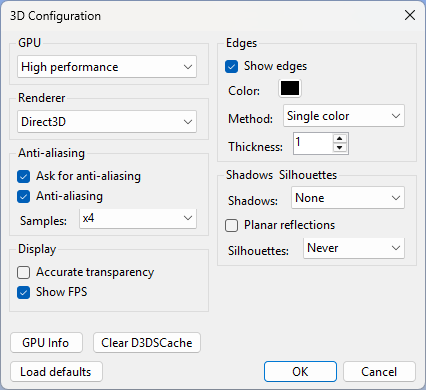
The 3D Configuration dialog (menu Help / Setting 3D) provides several options that can help resolve rendering issues.
GPU
On systems with multiple GPUs (e.g. a laptop with an integrated Intel GPU and a dedicated NVIDIA or AMD GPU), Windows may assign the wrong GPU to MoDraw. Use the GPU setting to override this.
- System default — Windows decides which GPU to use
- Power saving — forces the integrated (low-power) GPU
- High performance — forces the dedicated GPU, recommended when the 3D view is slow or unstable
A restart of MoDraw is required after changing this setting.
Renderer
MoDraw supports two renderers. Depending on the graphics card and driver, one may work better than the other. Switch the renderer and restart MoDraw to apply the change.
- Direct3D — default renderer, recommended for most systems
- OpenGL — alternative renderer, useful when Direct3D causes errors
Clear D3DSCache
The DirectX shader cache can sometimes become corrupted and cause rendering errors. Click Clear D3DSCache to schedule a cache cleanup that will be performed automatically on the next start of MoDraw.